Do you find yourself repeatedly answering the same questions from shoppers? Questions about personalized options, wholesale availability, and care instructions are common queries that can fill up your inbox quickly. Setting up an FAQ section in your Etsy shop is an easy way to have those answers ready before shoppers even need to ask. This section can include answers to previous questions shoppers have asked you, provide helpful information regarding shipping, or give a quick walkthrough for placing custom orders. Or even all three of those things!
Read on to learn more about how to set up an FAQ section in your Etsy shop and why filling it out can help you provide excellent customer service.
Why FAQs Are Important in Your Etsy Shop
Think of your FAQs as supplementary to your listing descriptions, but applicable to your entire shop. Since Etsy is online, shoppers cannot physically hold products in their hands and ask you questions about them. Instead of sending a message, they may initially try to find the answer themselves via your shop’s homepage.
Having relevant information readily available can reduce the number of messages from potential buyers that hit your shop’s inbox on a daily basis, and this can save you time (which, as a small business owner, is precious). Then you’ll have more time to spend growing your shop by creating new listings and diving into keyword research. A well-maintained FAQ section also helps build trust with shoppers before they make a purchase, assuring them that you are an attentive and professional seller. Completing your FAQ section is also a simple step towards having a fully set-up Etsy shop and shows shoppers that you take your business seriously. Your FAQs also act as a backup to your shop policies. If a customer of yours encounters a problem with an item they purchased from you, clearly outlining their options in these two sections may alleviate any potential frustration.
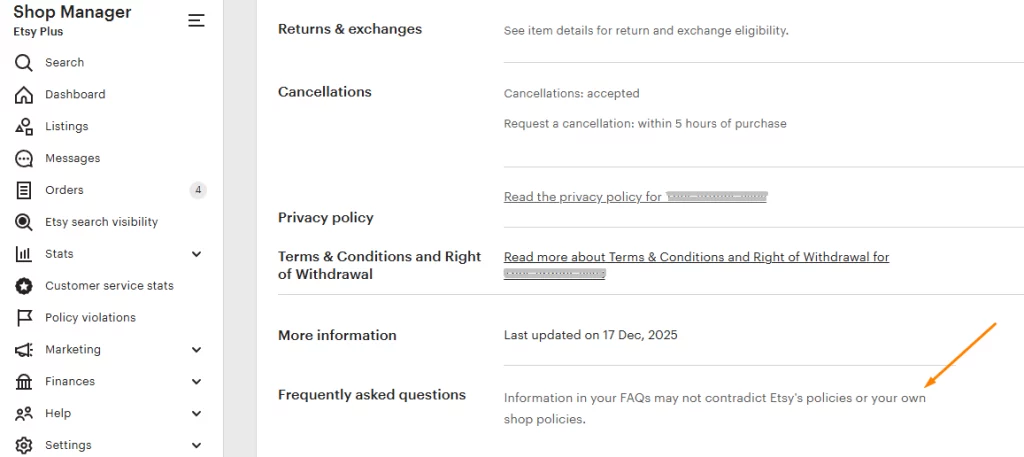
Keep in mind, though, that according to Etsy, “information in your FAQs may not contradict Etsy’s policies or your own shop policies.”
How To Add an FAQ Section to Your Etsy Shop
Currently, Etsy sellers can only edit their FAQ sections on a desktop browser. Follow these steps to set up your shop’s FAQ section:
- In your Etsy Shop Manager, go to the “Sales channels” section at the bottom of the sidebar and click the pencil icon next to your shop’s name.
- Scroll down to the “Frequently asked questions” section.
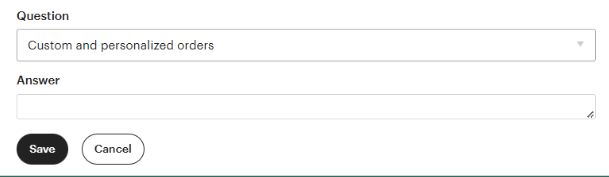
- Click “Add an FAQ” to access the template for adding both the question and the answer. You can choose one of Etsy’s pre-filled questions, or click “Custom” to craft your own.
- Once you’ve filled out the question and answer, click the “Save” button to add it to your FAQs.
When writing your FAQs, make sure that your answers are clear and concise. Speak in your brand’s “voice” to maintain consistency throughout your shop.
Frequently Asked Questions To Include
While you want the answers in your shop’s FAQs to be helpful, avoid overloading your customers with information. This way, they aren’t left with even more questions after visiting this section! Some ideas for this section are questions and answers regarding:
- Custom order processes
- Accessing digital download orders
- Returns or exchanges
- Processing or shipping timeframes
- Gift wrapping or personalization options
- Care or usage instructions for your products, if applicable
Build Trust With Your Etsy Shoppers
Building trust with your shoppers starts before they even make a purchase. Having answers to frequently asked questions readily available 1) shows shoppers that you are an attentive and professional seller, and 2) makes the browsing experience easier for them. It is also an effective way to quickly give shoppers the information they need to confidently make a purchase, which can dramatically reduce the number of product inquiries in your inbox. A completed FAQ section is one more step toward an Etsy shop that feels polished and trustworthy.
Already have an FAQ section in your shop? Share it in our eRank Facebook group or tag @erankseo on Threads. We’d love to see what questions you’re answering for your shoppers. If you’re not sure where to start, our community is always happy to help!
Ready to master Etsy SEO and grow your shop? Visit eRank University to watch step-by-step video courses designed to help you boost your listings’ visibility, increase sales, and grow your Etsy business.
Our team is continuously improving eRank’s tools to better serve our members. Due to this, some of the content featured in this post may differ from the content featured on erank.com.