For any Etsy seller, the path to sustainable growth extends beyond platform-specific keyword optimization. While knowing how to drive traffic to your Etsy shop is crucial, a truly resilient business model requires a direct line of communication with your customers. This is why building an email list is the single most important action you can take to future-proof your business. It is the most powerful marketing tool for Etsy sellers and is often seen as the primary marketing strategy for a successful Etsy store.
Think about it: every customer you acquire through Etsy is a valuable relationship that you don’t fully own. By starting your own Etsy email list, you create a private channel to your most loyal fans, independent of any third-party platform. This is the ultimate form of email marketing, ensuring you can always reach your customers and maintain business continuity, no matter what changes occur with Etsy’s rules. This is the answer to how to build an email list without a website and a foundational step to take your business to the next level.
Policies Regarding Email on Etsy
One of the first questions sellers ask is, “how to build an email list from Etsy?” The answer is simple: you cannot automatically add a customer’s email address from an order to your email list. This is strictly against Etsy’s policies and against many international data protection laws. Any attempt to use Etsy customer emails for unsolicited messages can lead to severe penalties, including shop suspension. The right way to collect emails is to get explicit, enthusiastic permission from your Etsy customers. This process is known as an opt-in.
The key is to use your Etsy shop and other marketing channels as a gateway to your email list from Etsy, without directly harvesting information. This is a multi-faceted approach that respects customer privacy while actively building your audience.
Strategic Methods to Collect Emails
Building a high-quality email list is all about providing a compelling reason for a customer to give you their email address. Simply asking them to “subscribe to your newsletter” isn’t enough. You need to offer something valuable.
Here are some of the best ways to get permission from your Etsy customers to join your subscriber list:
- Offer an Exclusive Incentive: Most people are wary of getting too many emails in their inbox. You must make it worth their while. A powerful incentive can be a discount coupon for their next purchase, early access to new product announcements, or a free downloadable guide (digital products). For example, offering a 15% discount code and a free guide on “caring for your handmade jewelry” can significantly increase your signup rate.
- Leverage Your Etsy Shop: While you can’t get an email list of Etsy shop owners directly from the platform, you can use your public shop elements to promote your list. Include a link to your external sign-up page in your “Shop Policies” and your “About” section. You can also place a short, easy-to-type URL in your Etsy shop banner. This is an elegant and compliant way to do email marketing for Etsy sellers.
- Utilize Physical and Digital Touchpoints: Every order you ship out is a chance to build your list. Include a small, branded card in your packaging with a link and a QR code directing buyers to your sign-up page. Promote your email list on all your social media profiles and use a dedicated landing page for your email marketing webshop that you can link to from Instagram or Facebook. This is a great solution for those who are wondering how to build an email list without a website.
We’ve embedded the video below starting right at the section that’s relevant to this topic. Please note that while the beginning and ending cover other subjects, the part you’ll see first is the one connected to this blog post.
Picking a Service Provider
Managing an email list requires the right tools. While you could use a simple spreadsheet, an email marketing service is essential for automation, compliance, and detailed analytics. Choosing the right Email Service Provider (ESP) is a key decision in your Etsy email marketing strategy.
For Etsy sellers who have an active Etsy Pattern site—Etsy’s standalone website builder—there’s a direct and seamless integration with Mailchimp. This makes it incredibly simple to collect emails from your Pattern site. Once you connect your Mailchimp account, a newsletter signup field appears on every page and on the purchase confirmation page. This is a great, compliant way to start your email list from Etsy with minimal effort.
If you have a separate website on a platform like Shopify or a custom site, you have many options. Mailchimp integrates easily with these platforms, as do many other powerful services like Klaviyo and Omnisend. These advanced platforms offer deep e-commerce integrations, allowing for sophisticated personalization and highly effective automated workflows. Regardless of your website setup, the right email marketing service will give you the features you need to grow your email list and drive sales.
When you’re choosing a provider, consider these factors:
- Ease of Use: Is the platform intuitive? Can you easily create a great-looking template without needing to be a designer? The best services offer a drag-and-drop editor and beautiful email templates that you can customize to match your brand.
- Automation: Can you set up automated email flows for things like abandoned carts, birthday offers, or a welcome series for new subscribers? This is where an email marketing service truly shines, as it saves you time and automatically drives repeat sales.
- Compliance & Deliverability: Does the service support double opt-in and comply with international regulations like GDPR? The right ESP helps you protect your brand and ensures your marketing emails land in the inbox of your email subscribers, not the spam folder.
Your Etsy Email Marketing Strategy: What to Send
The goal of your email campaign is to build a strong relationship with your potential customers and existing customers. You need to provide value that goes beyond just selling products. A solid Etsy email marketing strategy blends sales with helpful, engaging content. This is how to get your customers coming back.
Here are the best emails to send to your Etsy email list:
- The Welcome Series: This is a set of 3-5 automated marketing emails that go out when someone first signs up. This is your chance to introduce your brand’s story, share what they can expect, and deliver on your signup incentive. This is the first step to turning a casual visitor into an actual customer.
- Promotional Campaigns: Announce new launches or limited-time offers. Since your email subscribers are your biggest fans, give them early access to new products or special discounts. This is a highly effective way to drive sales and increase your return on investment (ROI).
- Educational and Behind-the-Scenes Content: Share your creative process, give tips on caring for your handmade business items, or show off a new item you’re working on. This type of content builds a deeper connection and makes your Etsy email marketing feel more like a friendship than a business transaction.
Measuring Success and Next Steps
The great thing about email marketing is that it’s highly measurable. Your ESP will provide a treasure trove of data. You can track your open rate, click-through rate, and most importantly, the revenue generated from each email campaign. This lets you see exactly how your efforts are paying off.
Building a quality email list takes time, but the ROI is undeniable. By consistently providing value, respecting customer privacy, and using the right tools, you’ll be able to get your Etsy shop to a place of true stability and long-term success.
This post is part of the Etsy Holiday Sales Hub 2026. Visit the hub for the full collection of holiday strategies, keyword trends, and seller resources.
If you’re an Etsy seller, you’re always on the lookout for opportunities to enhance your shop’s visibility and attract more customers, right? Well, good news: the Etsy’s Share and Save Program can help you drive traffic, reach more potential buyers, and even save on Etsy fees.
What is it, and how can it be useful to your shop? Here’s everything you need to know to start using the Share and Save Program effectively.
What Is the Etsy Share and Save Program?
The Share and Save Program is a marketing initiative designed to encourage Etsy sellers to share their shop links in their individual marketing to drive their own traffic to their shop and listings in exchange for savings on their Etsy fees. This program helps you promote your Etsy shop outside the marketplace while earning savings on transaction fees. It costs sellers nothing to participate other than a few moments to share the link, but it can translate into some great savings and extra cash in sellers’ pockets. Think of it as an easy way to turn your own marketing into Etsy fee refunds.
When a shopper clicks on your Share & Save shop link and purchases within 30 days of clicking the link, you receive a refund in the amount of 4% of Etsy transaction fees. And it’s not just a one-time savings! Any time that shopper completes an eligible order from your shop within 30 days of clicking the link, you’ll get that 4% of the order total refunded to your payment account. Therefore, it’s possible to receive savings from one customer multiple times within a 30-day time period. This makes repeat buyers even more valuable for your shop’s growth.
How to Join the Etsy Share and Save Program
Signing up is a simple process. First, go to your Etsy Shop Manager and click the “Marketing” tab in the main menu. Then, select “Share & Save” and click “Join Now” at the top of the page.
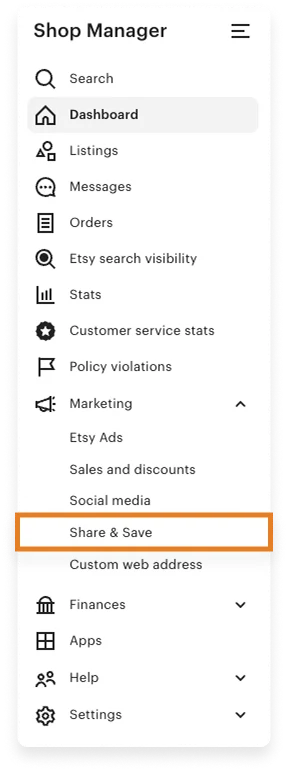
Once you have joined the program, it’s available to use in your marketing until you choose to opt out. There are no hidden requirements or extra steps. Once you’ve joined, you can immediately start sharing your links and earning savings.
Your trackable link never expires, so you never have to worry about updating your links outside of Etsy. As long as you stay enrolled in the Share and Save Program, every click you bring to your Etsy shop can help you save on fees and grow your visibility.
Where to Share Your Etsy Shop Link
Your Share & Save link should be used as part of your Etsy shop’s regular marketing strategy. After you register for the program, locate the unique link assigned to your shop on the Dashboard in your Shop Manager.
Your trackable shop link will look like this: yourshopname.etsy.com. This link is your personal tool to attract new buyers to your Etsy shop and earn a small refund on every qualifying sale.
Best Places to Use Your Share & Save Link
Share this link everywhere you post about your shop. Here are some ideal places:
- Your bio on any of your shop’s social media profiles
- In your shop’s social media posts
- On your business cards
- In your shop’s email marketing
- In your shop’s newsletter
You can also share it in blog posts, video descriptions, or any place where you talk about your products outside of Etsy. If your friends and family would like to help you out, you can give them this link to give out whenever they are asked about your Etsy shop.
Please note that Share & Save links sent to buyers through Etsy Messages or placed within a listing description on Etsy will not count towards the Share & Save benefits. The Share & Save link is for use outside of Etsy to drive traffic directly to your shop.
💡 TIP: need marketing ideas to drive sales? Check out Etsy’s Ultimate Guide to Social Media Marketing.
How to Share Links to Listings, Promos, and Reviews
In addition to sharing your entire shop, you can also share individual trackable links for specific listings, promo codes, and reviews. These links let you promote your products in different ways while still earning savings through the Etsy Share and Save Program.
To obtain a listing link, go to “Listings” in your Shop Manager, click the gear icon under the desired listing, and select “Share”. Etsy will provide you with the Share & Save link for that specific product and offer to post it to your social media with a single click. This makes it easy to promote your items where your customers are most active.
Promo codes can also contain the Etsy Share & Save trackable link. To find the shareable link for a promo code, click on “Marketing” in the main menu of your Shop Manager. Then, click “Details & Stats.” Click “Details” underneath any promo code to open a side panel with a trackable link that you can copy and paste. This can be a great way to combine discounts with traffic tracking and extra savings on your Etsy fees.
There are two additional uses of the Share & Save link that are available only through the Etsy Seller App: trackable links for reviews and shop sections.
- To share a review with a Share & Save link, go to the “Home” or “Reviews” section within the app. Then, find the review that you wish to share, tap the “…” icon, and choose “Share Review”
- To share a shop section, go to “Listings,” select the section you’d like to share, and tap “Copy Link”
These small steps can help you showcase positive feedback or promote specific product categories while also benefitting from the program.
Will this Program Hurt My Shop?
Many sellers believe that sharing their shop link outside of Etsy actually hurts their Etsy shop. This is a myth. Etsy designed the Share and Save Program specifically to reward sellers for driving their own traffic to the platform.
Etsy’s Share & Save Program is a fantastic opportunity for Etsy sellers to not only boost sales but also enhance their shop’s visibility on the platform. By encouraging sellers to drive customers to their Etsy shop, the program increases traffic to the platform.
Sharing your shop link through the Share & Save Program only benefits you as a seller. So, if you haven’t already, start incorporating the Share & Save Program into your Etsy marketing strategy and watch your shop thrive!
To learn more about Etsy’s Share & Save Program, check out this article on Etsy.
Want to dive deeper? This article is part of our Etsy Holiday Sales Hub 2026, where you’ll find the complete roadmap, keyword insights, and strategies to prepare your shop for the busiest season of the year.
Our team is continuously improving eRank’s tools to better serve our members. As a result, some of the content featured in this post may differ from the content featured on erank.com. Please note that quotas and data availability may differ per eRank plan.