
This post is also available in:
Updating an Etsy listing’s SEO is just the beginning. After you revise, the changes in that item’s search traffic that follow help you understand whether or not they’re actually improving traffic and sales.
eRank’s Listing Changes tool simplifies this process. It takes daily snapshots of your tracked listings, allowing you to track the performance of your Etsy listings through key stats such as views, favorites, and quantity available.
This tool is especially useful when testing new search terms or tweaking your listing titles to boost visibility. Let’s explore this powerful SEO tool and see how it can help you calibrate your Etsy strategy for better results.
How To Access the Changes Tool
On your eRank Dashboard, click the “Listing Optimization” tab on the left side of your screen. Then, select “Listings” to open the Listings tool. This tool displays your shop’s most recently updated active listings. Please note that the number of listings displayed depends on which eRank plan you signed up for.
If you are a Basic, Pro, or Expert member, select the “Track” button next to any listing to start tracking changes you make to the listing’s images, title, tags, price, views, favorites, and quantity in stock. Basic members can track up to five listings, Pro members can track up to 20 listings, and Expert members can track up to 50 listings. To view the changes for a particular listing, click the “See Changes” button that appears in place of the “Track” button. For easier access to the listings you’re tracking, toggle the button to the left of “Tracked Only” (located just above the listings table) to “on” to hide your untracked listings.
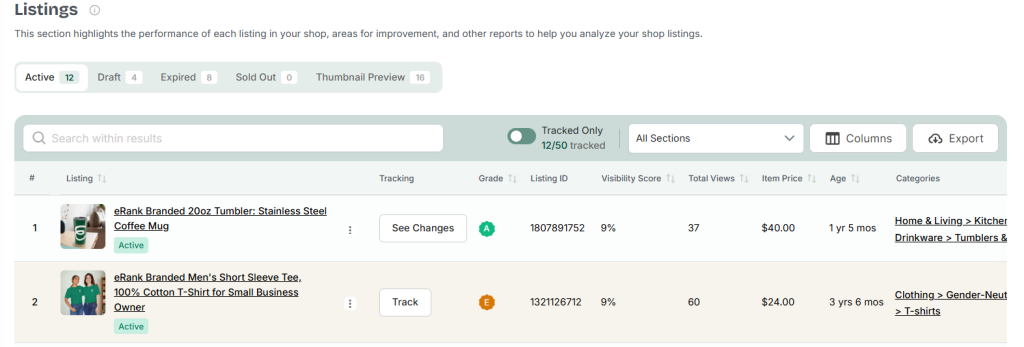
Clicking “See Changes” opens our Listing Audit tool and navigates you to the “Listing Changes” tab. In addition to performing a comprehensive audit of any listing, this tool allows you to monitor your listings via the “Changes” tab.
At the top of this section, you’ll see a graph showing the listing’s total sales, views, favorites, and quantity over time. Scroll down to view the item’s daily snapshots and change summary.
💡 TIP: Remember to turn tracking on before making changes to a listing. If you do this, eRank can capture a “baseline” for each item. You can then compare different versions of your listings’ SEO to this baseline over time to measure the effectiveness of your revisions.
Viewing a Daily Snapshot
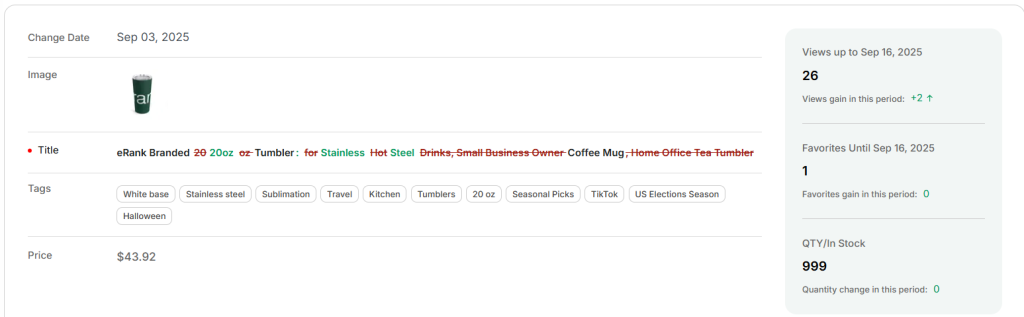
For each tracked listing, the Changes tool takes a daily snapshot that includes its total views, total favorites, the total quantity available, and more. It also shows any changes made to your listing’s title, tags, photos, and price. eRank highlights terms you have removed in red, while new additions appear in green. For titles, words you have removed are red with strikethrough formatting, and new additions are green.

When checking the quantity available, total views, and total favorites, watch for the red and green indicators that reflect changes. A red number means that the overall number has decreased. Note that, for the “Quantity Available” column, this is typically a good thing. It means you made a sale! A green number indicates an increase in any of the aforementioned metrics.
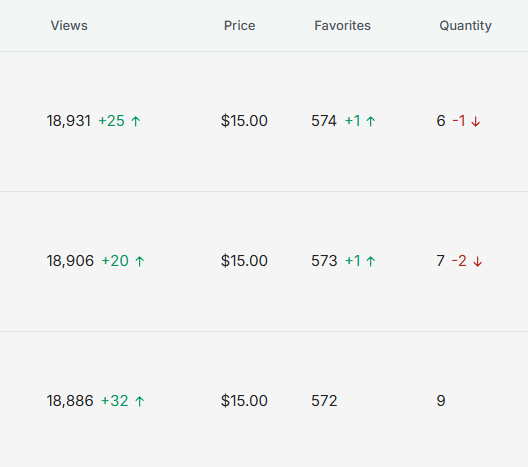
These reference points can provide valuable insights for making business decisions for your shop. Knowing when your listings get the most traction can help you plan product launches and marketing campaigns. It can also help you determine the best times of the year to edit your listings.
Viewing a Change Summary
For a quick overview of your listing’s performance instead of daily updates, click the “Change Summary” button in the top right corner of the table. This section records each date that its performance metrics change. These changes are also noted in red and green. These updates help you determine if the revisions you make to your Etsy listings are positively or negatively impacting their search traffic.
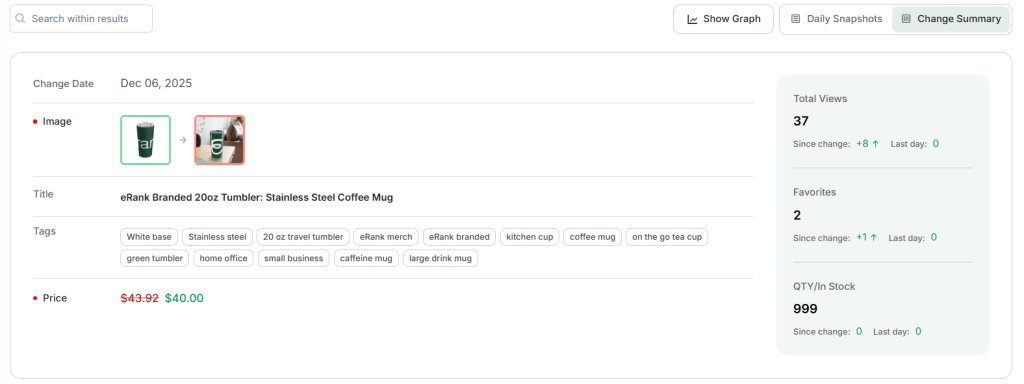
If an item’s views and favorites drop after you make changes, check a previous version of that listing’s SEO to see which terms you removed from it. You may want to consider adding them back to the listing. This is a great way to test and troubleshoot your listings when sales hit a slump.
If you’re not sure where to start, this eRank blog post walks you through the most common causes of low sales and shows you how to fix them.
Tracking Without the Changes Tool
If you’ve exceeded your quota for tracked listings, or if you’re a Free member, you can still keep tabs on your listings by manually tracking their changes. Access a free listing changes tracker PDF from our team here to use while you’re experimenting. Need some guidance on how to use the tracker, find the data, and assess the results? Use the companion guide alongside the tracker.
Learn What’s Working for Your Etsy Shop With eRank
It’s not enough to make a few changes to an Etsy listing and just hope for an increase in traffic. Use the Listing Changes tool to make data-driven decisions that help you better understand what works for listings of yours that aren’t getting enough traffic. Then, apply your insights to other relevant listings.
eRank’s Listing Changes tool is a great way to see how edits to a listing impact its views, sales, and more. Knowing which search terms lead to higher clicks can, potentially, increase the conversion rate across your shop when you apply what you’ve learned to other product listings.
For more practical tips on how to improve your Etsy listings, this SEO checklist is a good place to start before tracking your next round of changes.
Want feedback on your SEO practices? Connect with other Etsy sellers who use eRank here:
Our team is continuously improving eRank’s tools to better serve our members. Due to this, some of the content featured in this post may differ from the content featured on erank.com.