Are you planning on taking a vacation this spring or summer? Spring and summer tend to be the slowest times of the year on Etsy, so it’s the perfect time for Etsy sellers to unwind, relax, and rejuvenate. Fortunately, you don’t have to stop selling on Etsy if you decide to take some time away from your shop, whether it be for a planned trip, an urgent matter, or any other situation. Sellers looking to pause their incoming orders can utilize Etsy Vacation Mode to take a break. But when, exactly, should you opt for this?
You may have heard some Etsy sellers advise against using Vacation Mode because it seems to negatively impact their sales. However, plenty of sellers use it regularly and claim that it’s never harmed their shop. So, which is it? And what alternatives are there to using Etsy Vacation Mode?
Let’s talk about how to activate Etsy Vacation Mode for your shop, how it may affect your shop, and some strategies to gain back momentum after time away.
How to Put Your Etsy Shop on Vacation Mode
To turn on Vacation Mode:
- On the left side of your Etsy Shop Manager Dashboard, select “Settings.”
- Select “Options” from the dropdown menu.
- Select the “Vacation Mode” tab (or “Holiday Mode”, depending on where you live) to access the Vacation Mode page.
Here, you can activate Vacation Mode using the toggle in the topmost section. You can also add a note that replaces your shop’s announcement while you’re away and schedule an auto-reply message, if needed (we recommend that you do both of these things). If you know when you’ll be coming back, make a note of it in both of these places. This way, potential buyers know when they can come back and place an order.
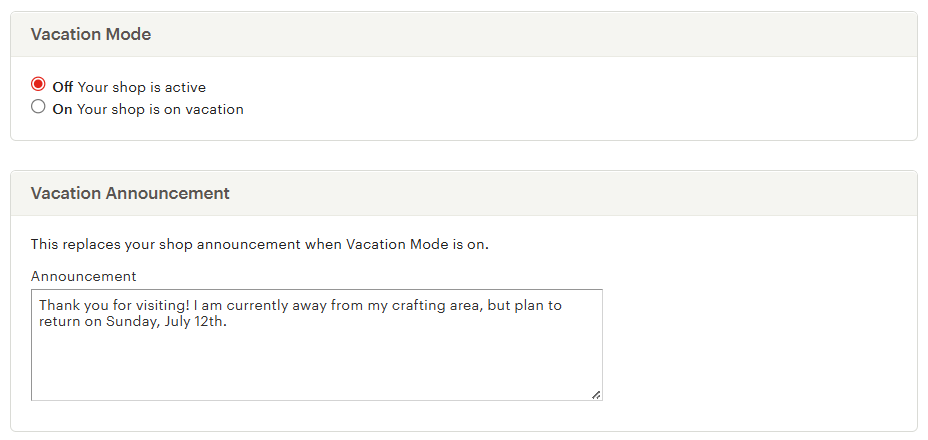
When your shop is in Vacation Mode, anyone visiting your Etsy storefront will be greeted with your vacation announcement on a banner that looks like the one below. Visitors can click the “Email me when they’re back” button for Etsy to notify them on your behalf when you reopen.

What Happens to Your Etsy Shop in Vacation Mode?
When you put your shop on vacation, your listings will not be shown in search or on your Etsy storefront. However, if a shopper searches for your shop’s name, they can still find your shop page and will see this notice. Potential customers will still be able to favorite your shop. And your loyal customers will know that no, you haven’t vanished off the face of the earth. You’re just taking a breather!
When your shop is in Vacation Mode, you can still process open orders and continue messaging customers as needed, but no new orders can come in. You’re also still able to edit listings. In fact, you can do all the tasks you normally do while running your business.
Etsy Ads and Vacation Mode
If you’re running Etsy Ads when you activate Vacation Mode, your ad campaign will automatically pause until you reopen. With all your listings unavailable for purchase, why pay for advertising, right?
Star Seller Status
It’s important to note that Etsy will still evaluate the last three months of your shop’s performance on a monthly basis for the Star Seller program, regardless of whether or not your shop is active. If you’ve been meeting the program’s metrics, you should retain your Star Seller status. That is, provided you still meet the sales-count metric. Otherwise, having no sales while on vacation could impact your status. And, if your shop almost qualifies for Star Seller status, the time you’re in Vacation Mode will be lost time you could have otherwise put towards that goal.
Listing Auto-Renewals
Be sure to note the fine print under the Vacation Mode tab on Etsy. “…Listings with Auto-renew enabled will continue to renew while your shop is on vacation.” This means that, if you’ll be gone for an extended period of time and you use Auto-renew for any of your listings, you might want to disable that setting during your break. Instead, set your listings to Manual renewal, so you won’t be charged any renewal fees before your shop reopens.
Alternatives to Etsy Vacation Mode
Extend Your Processing Times
Here are some ways to let your customers know that your shop’s turnaround time will be longer than usual for a specific period of time (because you’re temporarily stepping away from order fulfillment). This way, your customers won’t be surprised when their order takes longer to ship.
- Update your products’ shipping profiles
- Add a note to your shop announcement
- Add information regarding your shop’s temporarily extended turnaround time at the beginning of your order confirmation message
- You can also add this information to your listings’ descriptions (edit multiple listings at once to save time)
- Set an auto-reply in your Etsy inbox to notify anyone who contacts you of your absence
- Set up saved replies in advance so you can respond to inquiries in just a few taps, even from your phone
- Use an image slot in each of your listings to display information regarding your shop’s temporary turnaround times, if one is available
You can also try extending processing times if you are feeling under the weather, have supply chain issues, or just need a bit of time to relax. Simply message each buyer and ask if they’d rather a) wait longer for their items, or b) cancel for a full refund. While this is acceptable, it usually isn’t a viable option for a high-volume shop. Additionally, it’s important to note that Etsy only allows you to extend processing time once per order. So, if you are uncertain of when you’ll be back, allow for that. It’s always better to cancel an order than ship it late.
Temporarily Deactivate Your Listings
Maybe you’re not going away, but you’re absolutely buried in orders and need to catch up! If this is the case, don’t hesitate to deactivate all your listings, especially if you run your business alone or have other important commitments. Your Etsy shop remains open, and you can still fill orders and send messages. However, with all of your listings deactivated, shoppers won’t be able to place new orders.
If you want to keep at least a few listings active, try deactivating your most time-consuming products, or those that require personalization or customization. Doing so will lighten your workload and, hopefully, leave you feeling a bit less overwhelmed. Give yourself time and space to fulfill orders for your ready-to-ship items until you are caught up.
Temporarily Raise Your Prices
Experienced sellers suggest this option surprisingly often. Do you often feel pressed for time? If so, it’s only fair that you price your time a bit higher. Consider starting with your bestsellers and your most time-consuming products, as these are the listings that are most likely to maintain steady demand at a higher price point.
This will, theoretically, slow down your sales a bit, but you may find that your profit stays the same or even increases. Once you’ve caught up and are ready to accept more orders, you can lower your items’ prices back to what they originally were. Although, if you find that you’re still making a decent profit, maybe it’s time to raise prices permanently!
Returning From Etsy Vacation Mode
Some sellers worry that using Etsy Vacation Mode can hurt their shop, from a ranking perspective. But that isn’t the case. Taking a pause has no negative effect on your shop quality or customer experience scores.
However, while your shop is on a break, your competitors are still acquiring views, favorites, and sales, so they may climb the ranking ladder while your shop stays stagnant. This means that your competitors’ shops may temporarily rank higher than yours in search due to recent activity. As this is a quiet time of the year, they likely have not had many sales, so you will more than likely catch up to them soon.
Once you reopen your shop, make sure to let your followers on social media know. And remember to reactivate any ad campaigns or auto-renewals that were turned off during your break. Consider running a sale or releasing a few new products to help your views bounce back. If things are slow to pick up, here’s how to get your shop back on track.
It’s Okay To Take a Break!
The thought of temporarily closing when your Etsy business is doing so well may be scary. However, it might just save you from missing messages and shipping deadlines. And those definitely would impact your shop and listing quality scores! Sometimes, best practice involves knowing when to take a step back.
Running a small business can take a lot of time and energy, so it’s important to listen to your body (and mind) and take a break away from your shop. Etsy Vacation Mode allows you to keep your shop operational while taking a short break. There is no minimum or maximum time for this setting. Use it whenever you need to step away from your shop for awhile (and when none of the alternatives we discussed earlier are practical). Then, come back rejuvenated and ready to dive back into business as usual.
Our team is continuously improving eRank’s tools to better serve our members. Due to this, some of the content featured in this post may differ from the content featured on erank.com.