Updated October 1, 2026
Note: All screenshots and setting data was taken from the US version of the Etsy dashboard.
Unless you are only selling digital or POD items, then you have to ship packages to your customers. Today we are going to dive into Etsy shipping settings details and provide a few other related tips.
Etsy Shipping Profiles
Creating shipping profiles on your Etsy shop will save time when creating listings. It’s also a great way to make changes to the shipping parameters of multiple listings.
To create a shipping profile, in your Etsy Shop Manager click on the settings icon on the bottom of the left side navigation pane, then click Shipping settings. Here you will find your shipping and processing times dashboard. Scroll down past the Order processing schedule and Your processing profiles sections to find the Shipping profiles area. Click Create profile in the upper right corner to build a new shipping profile.

A popup form appears, where you add the appropriate information and provide a name for the shipping profile.
First you will need to choose between Calculated and Fixed pricing. When you select Calculate them for me, Etsy calculates shipping prices for the package based on the buyer’s zip code and the package details. This gets added to the order total.

When you choose I’ll Enter Fixed Prices Manually you will need to enter the amount you will be charging for any packages associated with this shipping profile. This option is great if you need to charge shipping but want to entice buyers with a reasonable flat rate price. Keep in mind that for sellers based in the US, Etsy offers higher placement in search for certain listings with fixed shipping under $6. You can read more about which listings this applies to in Etsy’s article We’re Updating How Shipping Price Is Factored Into Search for US Domestic Listings.


Once you choose how you want pricing set, you will need to go through the rest of the fields. Everything in this popup is a required field. You can choose between fixed rates and free shipping from the drop-down options.
If you choose to set fixed prices for shipping, you have the ability to provide your buyers with shipping upgrade options that you can upcharge for by clicking the Add a shipping upgrade plus sign.
Free Shipping Guarantee (For US Buyers Only)
As many of you know, Etsy is big on free shipping. They have a program called “Free Shipping Guarantee”. This program provides shops who offer free shipping on orders over $35 with priority placement in search. This means that listings meeting the criteria will place higher in search than relevant listings that don’t meet those criteria.
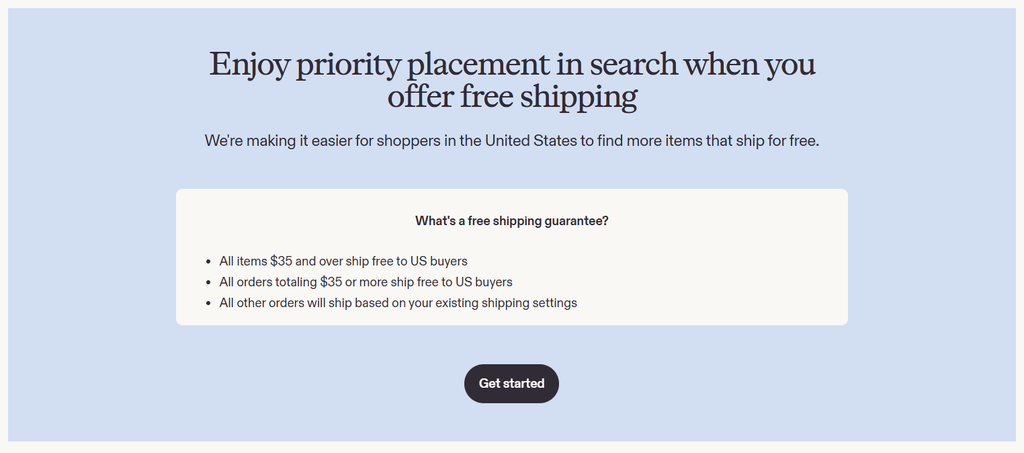
If you offer this guarantee, under the free shipping guarantee tab there is a tool to allow you to bulk reprice your products to compensate for your free shipping offer. To use this tool, click Start Repricing to open a popup where you can enter a dollar amount to raise your prices by. If you want to reprice items individually, you can click the button for Keep Current Prices then click review and edit.
On the next screen you will be able to filter your items by category and shipping profile, and you will have the option to modify each items price individually.
Package Preferences
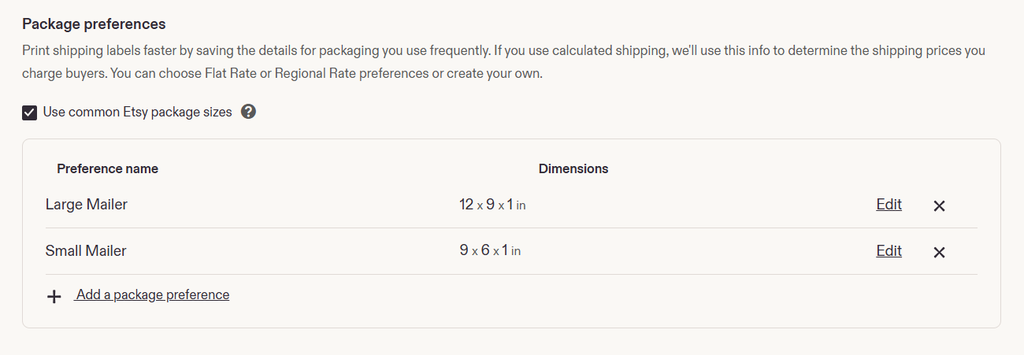
If you find yourself using the same few package sizes frequently, you may benefit from adding the packaging details in this section. Here you can add and name custom package dimensions to use for calculated shipping. In addition to creating custom package sizes, you can also select from common package sizes for the carrier.
Rates and Upgrades
Under the rates and upgrades tab, you will see the option to choose between Post Office Retail Rates and Etsy Shipping Label Rates. Post Office Retail Rates are the rates that would be charged to ship the package from the Post Office counter. Etsy Shipping Label Rates are the price that an Etsy seller pays for a shipping label due to the commercial relationship Etsy has built with the Postal Service.
The biggest difference between these two options is the price the customer is charged for shipping. Choosing the retail rates allows you some wiggle room to offset some of the packaging costs or fees. Choosing Etsy shipping labels passes on the commercial savings to your customers. Also, Etsy Shipping Labels bump the weight limit on First Class packages (now known as USPS Ground Advantage) from 13oz to 15.999oz.
Below the rates options, you will see that you have the choice between enabling and disabling shipping upgrades. This lets you decide whether you will allow the option for buyers to upgrade their shipping service.

Shipping Label Options
At the top of this page is the address fields where you can make changes to how your “From” address displays on your labels.

Below the from address, you can modify your preferences for your shipping labels.
Download Labels
Here you can select how your label is downloaded and printed. If you are using a traditional printer, you can select between one or two labels per page. If you use a dedicated 4×6 label printer, you can select that option.
Pre-Filled Calculated Shipping Labels
This pre-populates mail class, weight, and dimensions on calculated shipping labels based on those fields from the item listing. If something changes before you purchase the label, you can make edits to those fields before purchasing and printing the label.
USPS Customs Form Signature
If you are shipping an international package through the USPS, you are required to sign and date the label for customs. Here you can choose between having your signature and the date added when you are printing the label or not. This can be a time saver if you are shipping a lot of international packages.
International Customs Form
By default, Etsy adds your listing title to the customs form as the item description. You can also choose to type a custom description to use across all international shipping labels.
Default Label Preset
This simply lets you choose which of your shipping profiles are used as the default when purchasing labels. If you find that you frequently sell items that use a particular shipping profile, you might consider setting that as your default.

Printing Shipping Labels
Unless you are getting your shipping labels at your carrier’s drop off location, you are going to need to print shipping labels for your packages. Let’s look at a few common options:
Print, Cut, and Tape
This method requires the least amount of equipment and doesn’t rely on any special paper. Whether you’ve been selling online for years, or just started, you have probably used this method. Simply print your shipping labels on standard printer paper, cut them out, and tape them on to your package.
Adhesive Label Sheets
A quick trip to your local office supply store, or online search will show you that there are plenty of options for adhesive label sheets that conveniently fit in your inkjet or LaserJet printer. Many of these sheets are 8.5×11” and are split in the middle giving you’re the ability to print two labels to a sheet.
Thermal Label Printer
While it may not be in every shop’s budget, it is one of the quickest and most efficient ways to print your shipping labels. They are useful if you are printing many labels at a time. These are specialized printers that use heat to print onto thermally activated labels. Another benefit is that if you need to print other documents, you won’t need to continually swap out paper.
Using Other Carriers with Etsy
For shops based in the US, you can purchase shipping labels for USPS, Fed Ex, and UPS directly through Etsy. For non-US sellers, you also can choose to use a different carrier, such as Royal Mail or another international carrier, or use a third-party shipping service like Pirate Ship.
If you purchase your shipping label anywhere other than Etsy, you will have to manually complete the order and provide the tracking number. In order to qualify for Etsy’s Star Seller program, you must ship 95% of orders on time and include tracking information, when applicable.
Get Those Packages Shipped
As you might expect, shipping is handled differently all around the world. The data and information above are based on carriers and shops shipping from the US. While many of the features and settings within Etsy function the same outside of the US, keep these tips in mind. Especially before the busy holiday season, take some time to double-check your shipping profiles, to ensure a smooth shopping experience for your buyers.