Alt text is more than just a descriptive string of words attached to images. It’s an important element that can enhance your Etsy shop’s visibility on search engines. Whether you’re an established Etsy seller or just starting out, learning how to add alt text to your listings is critical for elevating your shop’s search engine optimization (SEO) and ensuring that your visual content is accessible to all users.
What Is Alt Text, and Why Does It Matter on Etsy?
Alt text, or alternative text, is a short textual description of an image’s content. Having alt text for your listings’ images can help your reach in two important ways:
Accessibility
Alt text ensures that your shop caters to shoppers with visual impairments. Screen readers use alt text to describe images. This allows visually impaired users to “see” your items in detail. This is one way to make them more accessible to users with disabilities.
It’s important to be descriptive when writing alt text. For example, instead of simply writing “bracelet” in an image’s alt text field, write something like “Handmade silver bracelet with turquoise stones in a floral design.”
This level of detail ensures that shoppers fully understand what you’re selling, even though they cannot see the image.
Without alt text, a screen reader cannot describe the listing. So, any shopper using a screen reader will likely scroll right past it.
SEO
Alt text can help you reach a broader audience and give your shop’s SEO a competitive edge. It plays a significant role in SEO by helping search engine bots understand your Etsy listings’ images. When your product images are indexed well in search engines, your listings are more likely to be shown to potential buyers searching for relevant terms.
For instance, if your listing photo depicts a handmade leather wallet, using keywords like “handmade leather wallet with two card slots” in your alt text can make the image more discoverable to search engines.
This boosts your shop’s visibility in both on-platform and off-platform searches. Adding alt text is a smart habit to build. From an SEO perspective, it adds to the many ranking factors Etsy considers. The more of these you have working in your favor, the better.
How Can You See Which Images Have Alt Text?
If you’re unsure of which images still need alt text, use eRank’s Listing Audit. This tool shows sellers which images already have alt text and which ones are missing it.
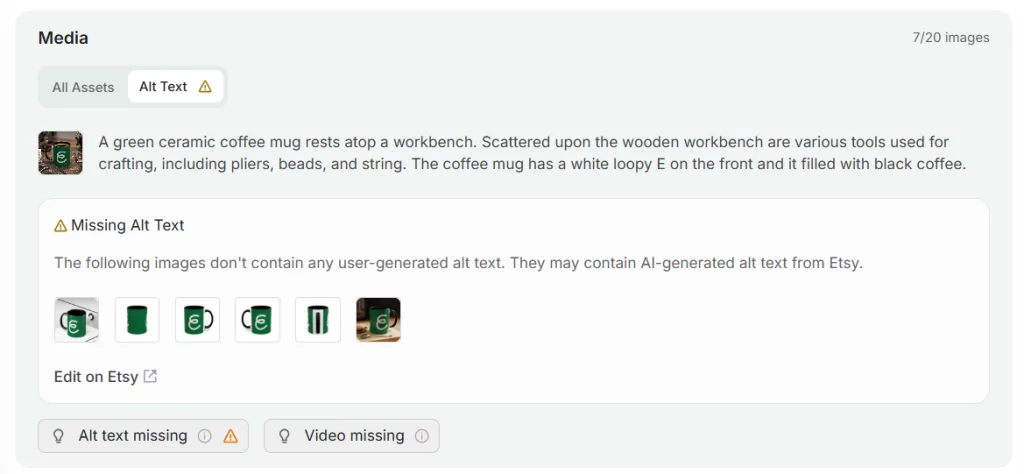
💡Please note that this feature does NOT show any Etsy-generated alt text, but does note those images that may have it.
How Can You Edit Alt Text in Your Listings?
You can add alt text to your Etsy listings on both the website and the app.
On Etsy.com:
- Sign in and go to your shop manager.
- In the side panel on the left, click “Listings.”
- Open the listing you wish to edit.
- Select the photo you’d like to update.
- Click the “Alt text” button below the photo.
- Enter your descriptive alt text into the field provided.
- Click the “Apply” button below the field.
On the Etsy Seller App:
- Sign in to the app and click “Listings.”
- Select the listing you wish to edit.
- Tap the pencil icon in the “Photo and video” section.
- Click the Alt Text icon to edit.
- Add your description in the field provided.
- Click “Save.”
What Are Best Practices for Writing Alt Text?
Etsy recommends adding alt text to multiple product images in your listings, especially for different views or variations. This enhances accessibility and ensures that all shoppers can engage with your content.
Principles for Writing Exceptional Alt Text
- Be Descriptive: Clearly describe the image with details that are central to shoppers’ understanding of the product. (e.g., “Tall white ceramic vase with blue hand-painted blossoms and a glossy finish”).
- Include Key Details: Highlight size, material, or textures where relevant.
- Use Keywords Naturally: If the keyword is relevant, incorporate it seamlessly into your text. Avoid keyword stuffing or phrases like “gift for mom” or “perfect for teens.”
- Don’t Duplicate: Ensure that each image has unique alt text to enrich the buying experience.
- Skip the Obvious: Avoid starting your alt text with phrases like “image of” or “photo of.” Screen readers already announce that it’s an image, so this just wastes valuable character space.
💡 TIP: You don’t need to add alt text to every image in every listing right away. Start with your best-performing listings, then expand over time. Make it part of your routine whenever you create a new listing or refresh an older one.
Double-Check Etsy’s AI-generated Alt Text
Etsy states, “If you don’t provide a text alternative to describe an image, Etsy will automatically add a description to your listing using AI-generated text.” As you can see from the following example, the AI doesn’t always get it right:
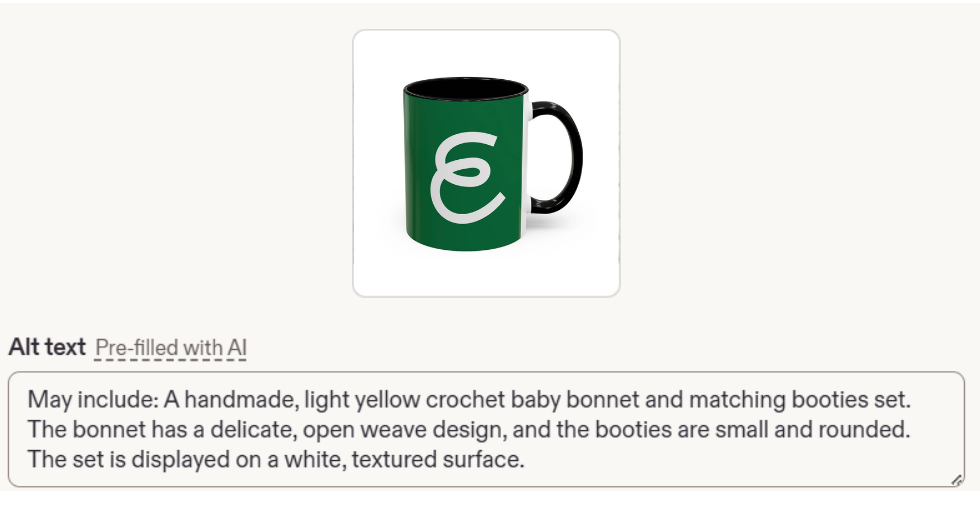
It is worth spending time manually optimizing your alt text instead of relying solely on Etsy’s AI-generated version. You know your products, materials, and target keywords better than Etsy’s AI does, so check in on your photos to ensure that they aren’t describing a completely different product.
Examples of Effective Alt Text for Etsy Listings
- For Jewelry: “Gold-plated hoop earrings with cubic zirconia stones arranged in a floral pattern.”
- For Apparel: “Red wool cardigan with hand-stitched floral motifs on the sleeves.”
- For Home Décor: “Rustic wooden coffee table with a reclaimed pine surface and black steel legs.”
These examples capture the essence of the products while integrating useful details.
Checklist for Optimizing Alt Text on Etsy Listings
- Ensure every key product image has alt text.
- Write unique text for each image to provide additional details.
- Aim for concise descriptions: Etsy enforces an alt text character limit of 250 characters, so keep your description succinct and focused.
- Incorporate keywords naturally; don’t overload them.
- Avoid repeating product titles; diversify to describe image-specific details.
- Regularly review and update alt text as your products evolve.
By taking the time to add alt text to your Etsy listings, you can enhance their accessibility, improve your shop’s visibility in search engines, and provide a better experience for shoppers who use screen readers. Every small step contributes to the larger goal of making your shop more discoverable and inclusive.
For more information about alt text, read this article from Etsy’s Help Center.
Our team is continuously improving eRank’s tools to better serve our members. Due to this, some of the content featured in this post may differ from the content featured on erank.com. Please note that quotas and data availability may differ per eRank plan.