If you’re an Etsy seller, you’re always on the lookout for opportunities to enhance your shop’s visibility and attract more customers, right? Well, good news: Etsy’s Share and Save Program can help you drive traffic, reach more potential buyers, and even save on Etsy fees.
What is it, and how can it be useful to your shop? Here’s everything you need to know to start using the Share and Save Program effectively.
What Is the Etsy Share and Save Program?
The Share and Save Program is a marketing initiative that encourages Etsy sellers to share their shop links in their own marketing to drive traffic to their shop and listings, in exchange for savings on Etsy fees. This program helps you promote your Etsy shop outside the marketplace while earning savings on transaction fees. It costs sellers nothing to participate (other than a few moments to share the link), but it can translate into some great savings and extra cash in your pocket.
When a shopper clicks on your Share & Save shop link and purchases something from your shop within 30 days of clicking, you receive a refund in the amount of 4% of Etsy transaction fees. And it’s not just a one-time savings! Any time that shopper completes an eligible order from your shop within 30 days of clicking the link, you’ll get that 4% of the order total refunded to your payment account. Therefore, it’s possible to receive savings from one customer multiple times within a 30-day period. This makes repeat buyers even more valuable for your shop’s growth.
How To Join the Etsy Share and Save Program
Signing up is a simple process. First, go to your Etsy Shop Manager and click the “Marketing” tab in the main menu. Then, select “Share & Save” and click “Join Now” at the top of the page.
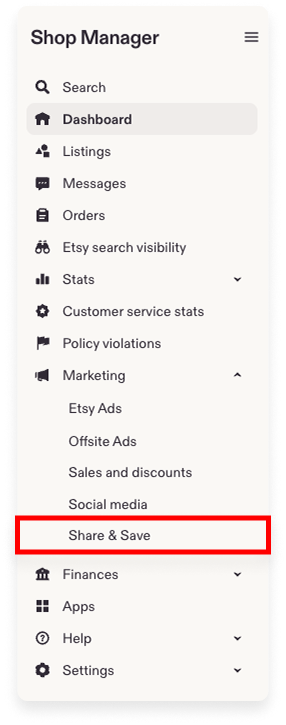
Once you join the program, you can use it in your marketing until you choose to opt out. There are no hidden requirements or extra steps. Once you’ve joined, you can start sharing your links and earning savings immediately.
Your trackable link never expires, so you never have to worry about updating your links outside of Etsy. As long as you stay enrolled in the Share and Save Program, every click you bring to your Etsy shop can help you save on fees and grow your visibility.
Where To Share Your Etsy Shop Link
Your Share & Save link should be used as part of your Etsy shop’s regular marketing strategy. After you register for the program, locate the unique link assigned to your shop on the Dashboard in your Shop Manager.
Your trackable shop link will look like this: yourshopname.etsy.com. This link is your personal tool to attract new customers to your Etsy shop and earn a small refund on every qualifying sale.
Best Places To Use Your Share & Save Link
Share this link everywhere you post about your shop. Here are some ideal places:
- Your bio on any of your shop’s social media profiles
- In your shop’s social media posts
- On your business cards
- In your shop’s email marketing
- In your shop’s newsletter
You can also share it in blog posts, video descriptions, or any place where you talk about your products outside of Etsy. If your friends and family would like to help you out, give them this link to share whenever someone asks them about your Etsy shop.
Please note that Share & Save links sent to buyers through Etsy Messages or placed within a listing description on Etsy will not count towards the Share & Save benefits. The Share & Save link is for use outside of Etsy to drive traffic directly to your shop.
💡 TIP: Need marketing ideas to drive sales? Check out Etsy’s Ultimate Guide to Social Media Marketing.
How To Share Links to Listings, Promos, and Reviews
In addition to sharing your entire shop, you can also share individual trackable links for specific listings, promo codes, and reviews. These links let you promote your products in different ways while still earning savings through the Etsy Share and Save Program.
To obtain a listing link, go to “Listings” in your Shop Manager, click the gear icon under the desired listing, and select “Share.” Etsy will provide you with the Share & Save link for that specific product and offer to post it to your social media with a single click. This makes it easy to promote your items where your customers are most active.
Promo codes can also contain the Etsy Share & Save trackable link. To find the shareable link for a promo code, click “Marketing” in the main menu of your Shop Manager. Then, click “Sales and discounts.” Under the “Details & Stats” tab, click “Details” underneath any promo code to open a side panel with a trackable link that you can copy and paste. This is a great way to combine discounts with traffic tracking and extra savings on your Etsy fees.
There are two additional uses of the Share & Save link that are available only through the Etsy Seller App: trackable links for reviews and shop sections.
- To share a review with a Share & Save link, go to the “Home” or “Reviews” section within the app. Then, find the review that you wish to share, tap the “…” icon, and choose “Share Review.”
- To share a shop section, go to “Listings,” select the section you’d like to share, and tap “Copy Link.”
These small steps can help you showcase positive feedback and promote specific product categories while also benefiting from the program.
Will This Program Hurt My Shop?
Many sellers believe that sharing their shop link outside of Etsy actually hurts their Etsy shop. This is a myth. Etsy designed the Share and Save Program specifically to reward sellers for driving their own traffic to the platform.
Etsy’s Share & Save Program is a fantastic opportunity for Etsy sellers to boost sales and enhance their shop’s visibility on the platform. By encouraging sellers to drive customers to their Etsy shop, the program increases traffic to the platform.
Sharing your shop’s link through the Share & Save Program only benefits you as a seller. So, if you haven’t already, start incorporating the Share & Save Program into your Etsy marketing strategy and watch your shop thrive!
Want to dive deeper? This article is part of our Etsy Holiday Sales Hub 2026, where you’ll find the complete roadmap, keyword insights, and strategies to prepare your shop for the busiest season of the year.
Our team is continuously improving eRank’s tools to better serve our members. As a result, some of the content featured in this post may differ from the content featured on erank.com. Please note that quotas and data availability may differ per eRank plan.