This post is also available in:
When listings renew on Etsy, their expiration date extends by four months. If a listing hasn’t sold before its expiration date, it may be worth taking a closer look. Although it may seem like staying on top of your bestsellers can lead to the most success, tracking the performance of both your high-performing and low-performing listings is crucial for the expansion of your small business.
Learning what works and what needs improvement can help you refine your shop’s offerings and make it more appealing to your target audience. Optimize your product inventory by monitoring your views and sales over time. Listings with more sales and positive reviews have higher listing quality scores. Naturally, this leads to ranking higher in Etsy search. Ensuring that your successful products thrive and updating underperforming items as needed can, potentially, give your shop a boost in search results.
In this article, you’ll learn how to identify your lowest-performing listings and the tools needed to master the process of optimizing them.
How To Identify Underperforming Listings in Your Etsy Shop
The stats available to you in your Etsy Shop Manager, along with eRank’s Listings tool, can help you pinpoint your weaker listings. While each of these gives different metrics, using them together gives you a wider scope of how your individual listings perform on a daily, weekly, monthly, and even yearly basis.
Using Etsy Stats
To view your Etsy shop’s stats:
- Go to your Etsy Shop Manager.
- Select “Stats” from the side panel on the left side of your screen.
- Select “Shop Traffic” from the dropdown menu.
- Use the dropdown menu at the top of your screen to select the time frame you want to review. eRank recommends reviewing at least three months of data. This provides you with insight into shoppers’ behavior over an extended time period and helps you spot patterns.
At the top, you’ll see the visits, orders, conversion rate, and revenue for your shop within the specified time frame. Scroll down past the “Shopper Stats” section to see your listings sorted by views (although we encourage you to come back to this section later and learn how shoppers are finding your Etsy store!). For now, focus on active listings by selecting “Active” from the dropdown menu on the right side of your screen. Then, filter by views, favorites, orders, or revenue to pinpoint the low-performing listings.
Using eRank
After ensuring that your Etsy shop is connected to eRank, you can “dive deeper” using the Listings tool. To get there, go to eRank’s Main Menu on the left side of your screen and select “Listing Optimization.” Then, select “Listings” from the dropdown menu. There, you can view your active, drafted, expired, and sold out listings. Just like when you were viewing your shop’s metrics on Etsy Stats, you’ll need to focus on the active listings for an overview of your current products. Click “Columns” to add relevant metrics to the table, such as visibility score and total views, or remove metrics that don’t interest you at the moment. Sort the data and identify underperforming listings by clicking any column’s header.
💡TIP: Metrics such as grade and visibility score are great places to start, but keep in mind that listing age, recent sales, and previous optimization affect both scores.
Watch this video for an overview of eRank’s Listing Audit, a tool that helps you identify your low-performing Etsy listings.
How To Improve Underperforming Listings
Once you’ve identified your lowest-performing Etsy listings, ask yourself: Why aren’t these items meeting shoppers’ expectations? Typically, the answer to this boils down to low views and/or low conversion. For each of these scenarios, there are steps you can take to potentially improve your items’ search rankings and increase the visibility of those individual listings. eRank recommends testing one change at a time and keeping track of all of the changes you’ve made. This way, if your changes lead customers to make a purchase, you may be able to replicate them across other listings or offer similar items. Additionally, if your changes cause your shop’s sales to drop, you’ll be able to undo those changes and take a different path.
Scenario 1: Low Views
If your listings don’t appear in search results, shoppers can’t click them! Assessing the quality of your offerings’ keywords, titles, and thumbnail images is a great place to start. Use eRank’s Listing Audit tool (which can be accessed by clicking any listing’s title in the Listings tool’s data tables) to identify missing tags, one-word tags, and any keywords with spelling issues. These are easy fixes that can have an immediate and positive impact on your shop’s visibility. Next, identify and include a “superstar keyword” in all areas of your listing. Superstar keywords are long-tail phrases that accurately identify your item and, generally, have high search volume and low competition. Learn more about superstar keywords here.

After ensuring that you’ve included a superstar keyword in a listing’s title, tags, and description, look at how else you can refine your SEO strategy for the listing. Reduce unnecessary repetition of terms and combine similar tags to free up space for a wider variety of search terms. Ensure that your title is concise, yet descriptive. Etsy recommends saving “gift” related keywords for tags, so you can keep your listings’ titles clear and easy to read. This way, you’ll be able to optimize your listings for Etsy’s search algorithm and for potential buyers shopping on the platform.
💡TIP: If you need a refresher or a crash course in Etsy SEO, read eRank’s Etsy SEO Basics blog post.
It’s not enough to simply appear on a search result page. Your thumbnails need to draw shoppers in and entice them to click! Use an eye-catching first photo that accurately represents the item. Photos that portray the product centered on a light background tend to result in higher click rates. However, please note that this can differ, depending on the featured product’s niche. If your shop has a “dark and mysterious” theme, it’s safe to assume that your target audience prefers those types of colors and photos. Don’t be afraid to style your products’ photos to best suit your business’s aesthetic!
Scenario 2: Low Conversion
When a listing receives visits (clicks), but those visits do not result in sales, it is time to review its photos, description, processing time, and price. Each of these factors can play a role in turning a browser into a buyer.
- Photos: For your poorly converting listings, fill as many of the 20 listing photo slots as possible (as well as the video slot) to potentially enhance conversion rates. The slots do not all have to be photos. Feel free to add infographics with important facts about your item. Infographics showing care instructions, shipping information, and info about how you created the product are all worth adding if you have enough room. You can also add a few photos of your workspace or process to give shoppers a peek “behind the scenes.”
- Description: Keep descriptions short, informative, and engaging. Include necessary details like size, dimensions, and materials. If you have writer’s block or need some help getting started, try eRank’s AI Listing Helper to generate a listing description. Remember to edit the suggestion to fit your brand’s voice, include your superstar keyword, and add other keywords in a way that sounds natural.
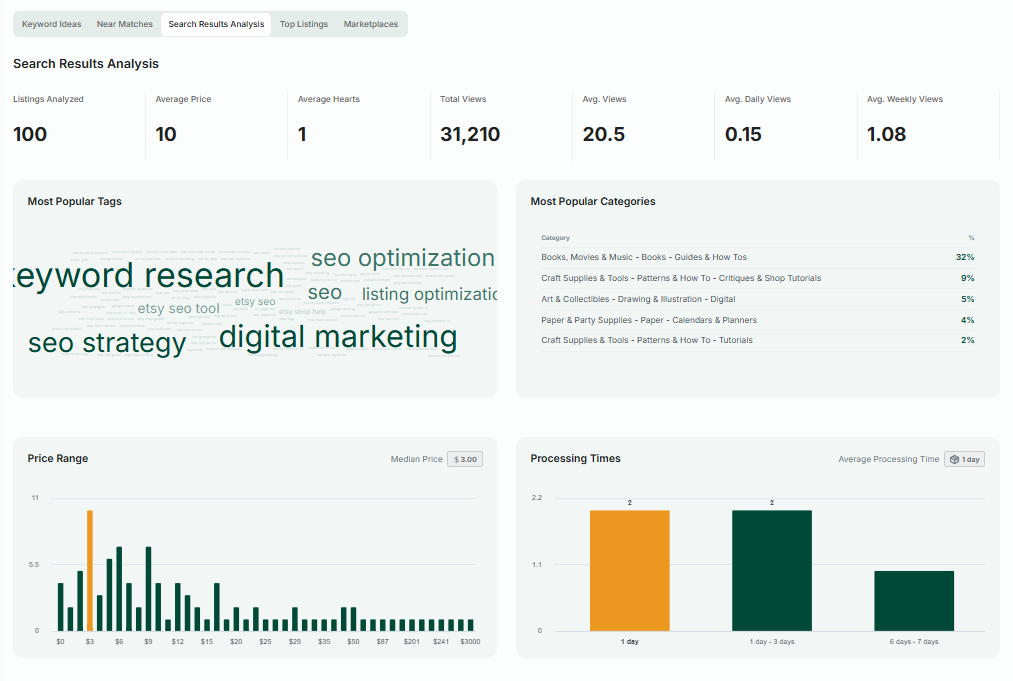
💡TIP: To learn more about using the AI Listing Helper, check out this eRank blog article. - Processing Times: Ensure your processing times are accurate and compare your processing times with similar listings to ensure competitiveness. Use the “Search Results Analysis” tab in eRank’s Keyword Tool to see how your processing times compare to those of the top 100 listings for the keywords that describe your listing.
- Price: Compare your prices with top listings using the “Search Results Analysis” tab in the Keyword Tool. While it may be tempting to price your items as low as possible, many Etsy sellers equate lower prices with lower quality. If you’re having trouble figuring out pricing for your listings, use eRank’s Profit Calculator.
Track Listing Optimization Changes
If you are a Basic member, Pro member, or Expert member, use the tracking function in eRank’s Listing Audit tool to monitor changes to any of your active listings’ images, title, tags, price, views, favorites, and quantity in stock.
To enable tracking, click the “Track” button next to the listing that you are optimizing. Once tracking is turned on, eRank takes daily “snapshots” of the item’s performance to monitor its progress so that you are able to see how your changes impact its performance over time. eRank recommends turning on this feature before you begin the optimization process.

To review the metrics, click the “See Changes” button. Here, you can view the item’s snapshots and analyze how the listing’s metrics have evolved since you made changes. Look for shopper behavior patterns, such as increased views or sales, that indicate improved performance.
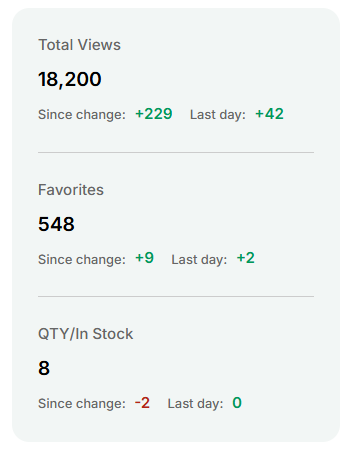
If no improvement is seen after a reasonable period (about 60-90 days), it is time to reassess your optimization strategy and consider additional adjustments, such as changing more keywords, testing new photos, or refining the description. Again, it is always best to make changes slowly and implement one change at a time in order to determine which optimization strategies work and which don’t.
Experiment To Boost Your Etsy Sales
Systematically identifying and optimizing your low-performing Etsy listings helps you enhance your Etsy shop’s performance and, potentially, boost sales. By using tools like Etsy’s “Stats” section and eRank’s listing optimization tools, you can easily review your shop’s search data and make informed decisions. Remember that success on Etsy is not a “set it and forget it” process. Successful Etsy sellers continuously track and adjust their strategies to stay competitive and drive sales. Gradual, consistent experimentation can bring incremental change, which can lead to bigger (and better) things over time.
To learn more about assessing and improving underperforming listings, check out this video by Etsy coach Starla Moore.
Our team is continuously improving eRank’s tools to better serve our members. As a result, some of the content featured in this post may differ from the content featured on erank.com. Please note that quotas and data availability may differ per eRank plan.